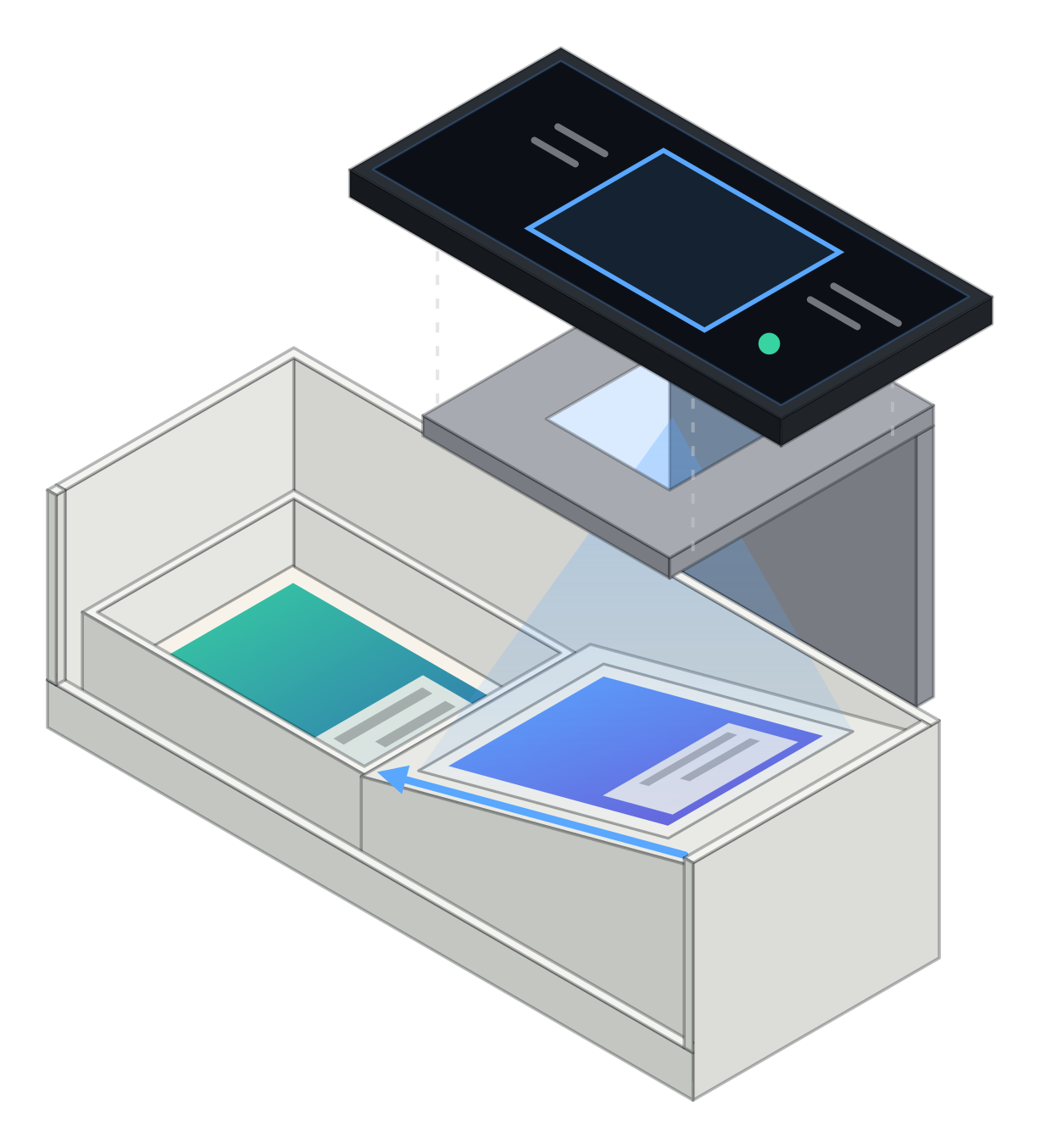
3D-printed card scanner stand
Alpha Scan Dock
Lay your phone on the bridge, camera down, and slide cards down the ramp beneath it. Every card passes under the camera at the same spot and lands in the bin, so a scanner app reads a whole stack without you holding the phone.
$29.99
Printed to order · ships in 3–6 business days · Free US shipping on prints over $49.99
Bridge colour: Stone
Box and bin
- Scanning box. The white base. A ramp inside carries each card under the camera and down to the low end.
- Card bin. A white tray at the low end that catches scanned cards. Lift it out to carry the stack away.
- Phone bridge. Slides onto the box over the ramp. Your phone lies on top with its camera over the window.
Printed to order, so all sales are final. If a print arrives broken, warped or not as pictured, tell us within 14 days of delivery and we will reprint it or refund you in full. Returns
How it works
How to use the Alpha Scan Dock
- 01
Set the bridge
Slide the bridge onto the box, with its open side facing you so cards go in easily.
- 02
Lay the phone down
Open your scanner app and lay the phone on the bridge, camera over the window.
- 03
Slide the cards
Feed cards down the ramp one at a time. Each one passes under the camera and lands in the bin.
The one rule
Why the box is always white
A camera scanner finds a card by its edges before it reads anything printed on it. On a plain white floor every card, dark border or light, stands out the same way, so the app locks on fast and reads the next card as soon as it slides in. That is why the box and bin are only printed in white. The bridge sits above the camera’s view, so its colour is yours to pick.
Alpha Scan Dock specifications
- Fits
- Unsleeved standard-size trading cards
- Parts
- Scanning box, card bin and phone bridge
- Box colour
- White, always
- Bridge colours
- Stone, Onyx, Scarlet
- Material
- Matte PLA
- Weight
- About 185 g
- Storage
- The three parts nest together
- Phone
- Any phone that lies flat; not included
- Works with
- Pokémon, One Piece, Magic, Lorcana, sports and other standard-size cards
Alpha Scan Dock questions
What does a card scanner stand do?
It holds your phone still, camera down, at the same height above every card. Cards slide down a ramp under the camera one after another, so a scanner app reads a whole stack without you holding the phone or framing each card by hand.
Which app does it work with?
Any camera-based card scanner app, including the scanner in the Cardboard Alpha app. The dock does not connect to the phone; it only keeps the camera steady and the card in the same place every time.
Why is the box always white?
A camera scanner finds a card by its edges. A plain white box gives every card the same clean background, so the app can pick the card out quickly. A coloured or dark box makes that harder.
Does it fit sleeved cards?
No. The chute is sized for unsleeved standard cards. A sleeve makes a card wider and thicker and it can catch on the ramp.
Will my phone fit?
Any phone that can lie flat on the bridge fits. Take a thick case or a large camera grip off first, so the camera sits close to the window.
How long until it ships?
Every dock is printed after you order. It leaves us within 3 to 6 business days, and US shipping then takes 3 to 8 business days. We email tracking the moment it ships.
Is it 3D printed?
Yes. Every dock is printed in matte PLA: a white box and bin, and a bridge in the colour you choose. 3D printing leaves fine layer lines on the surface.