Live comping · Whatnot shows
Know what every card is worth while the stream is live.
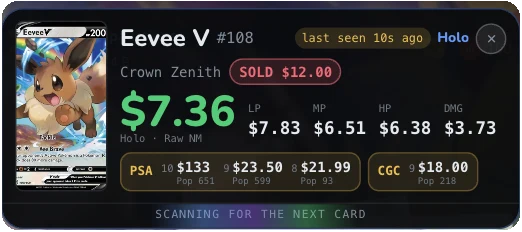
Hold a card up on stream and Cardboard Alpha names it and prices it right over the video: near mint and every played condition, PSA and CGC, rarity and age. Every lot that sells is stamped against market.
Chrome on desktopTERMINAL planiPhone app coming soon

The deal signal on every sold lot
- STEALsold at 50% of market or less
- GOOD DEALsold at 80% of market or less
- COOKEDsold at 2× market or more
- DEEP FRIEDsold at 3× market or more
How it works
Three clicks from stream to price.
Open a show
Watch any Whatnot show in Chrome on your computer, the way you already do.
Click the icon
Click Cardboard Alpha Live in your toolbar. The badge says ON and the overlay sits over the video.
Read the price
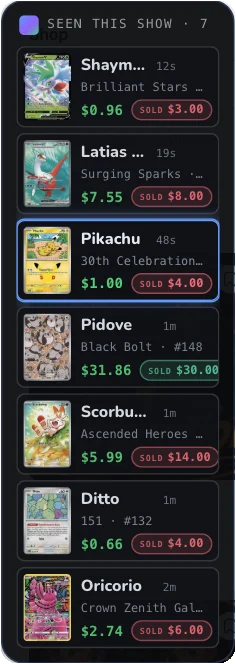
When the host holds a card up, the overlay names it and prices it. Each sold lot lands in the sidebar against market.
The overlay
Everything you would look up, already on screen.
Instant ID
The card in the host’s hand is matched to its exact printing: name, set and number. Until it is sure, the panel says so instead of guessing.
Every condition
Near-mint market price up top, then LP, MP, HP and damaged, so a played copy is priced as a played copy.
PSA and CGC
Graded prices by grade with the population count, and a low-pop flag when the count is thin.
Rarity and age
The rarity tier and the month it was released, with how many years ago that was.
Seen this show
A sidebar of every card identified on the stream, newest first. Tap one to bring its prices back.
Sold vs market
When a lot closes, its hammer price is stamped on the card: green under market, red over.
Who it is for
For buyers
Don’t overpay in the heat of a lot.
- See the market price before the timer runs out, not after.
- Know what a played copy or a slab is really worth before you bid on one.
- Watch what the room is paying: the sidebar shows every sale against market.
For sellers and hosts
Price your lots with the market in view.
- Check what a card is worth as you pull it, without leaving the stream.
- Set starting bids and buy-it-now prices from current prices, by condition.
- Watch each of your lots close against market as the show runs.
Where it works
On your computer now. On your phone soon.
- Chrome on desktopAvailable
The Cardboard Alpha Live extension, on the Terminal plan.
- iPhone appComing soon
Live comping inside the Cardboard Alpha app. Coming soon.
$18.99/ month
or $149.99 a year ($12.50 a month). Everything in Pro, plus the full order book and the highest limits.
Live comping: common questions
Does it record the stream?
No. The extension reads the video on the one tab you switch it on for, only while it is on, to identify the card. It does not record or upload the video, the audio or the chat. Click the icon again, close the tab or leave the show and it stops.
Does it touch my Whatnot account?
No. It never clicks, types, bids, scrolls or reloads anything, and it sends nothing to Whatnot. It only draws the overlay on top of the page you are watching. You bid exactly the way you always do.
How accurate is the card match?
It matches the card once the host holds it steady in frame. Glare, fast movement, a card half out of frame or a thick slab can slow it down or stop it, and when it is not sure it shows nothing rather than a guess. You can always check the card name on the panel against the card in the video.
Where do the prices come from?
The same market prices as every Cardboard Alpha card page: near-mint and played prices from recent sales and listings, and graded prices by grade. They are market reads, not a price anyone is guaranteed to pay or receive.
Which cards does it know?
English-language Pokémon cards. Japanese cards are not matched yet.
What does it cost?
Live comping is part of the Terminal plan. Terminal also includes everything in Pro: unlimited scans, full chart history, more alerts and the full order book.
Is Cardboard Alpha part of Whatnot?
No. Cardboard Alpha is independent and is not affiliated with or endorsed by Whatnot. The extension works on top of the Whatnot website in your own browser.
Price the next card before the timer runs out.